
Ms Word Shortcut Keys Test 2 Computer Subject
Ms Word Shortcut Keys Test 2 Computer Subject

Question 11
Move to the next edit location in document?
CTRL+PAGE DOWN moves the cursor to the next editing location.
Not clear enough?
Question 12
To switch into Print Layout view?
Both CTRL+ALT+P and ALT+CTRL+P switch Word into Print Layout view.
Not clear enough?
Question 13
To switch into Outline view?
Both ALT+CTRL+O and CTRL+ALT+O switch to Outline view.
Not clear enough?
Question 14
To switch into Draft view?
ALT+CTRL+N switches Word into Draft view.
Not clear enough?
Question 15
In outline view to promote a paragraph?
ALT+SHIFT+LEFT ARROW promotes a paragraph to a higher outline level.
Not clear enough?
Question 16
In outline view to demote a paragraph?
ALT+SHIFT+RIGHT ARROW demotes a paragraph to a lower outline level.
Not clear enough?
Question 17
In outline view to demote the body text?
CTRL+SHIFT+N applies the Normal style, demoting body text in Outline view.
Not clear enough?
Question 18
In outline view to move the selected paragraphs up?
ALT+SHIFT+UP ARROW moves the selected paragraph upward in Outline view.
Not clear enough?
Question 19
In outline view to move the selected paragraphs down?
ALT+SHIFT+DOWN ARROW moves the selected paragraph downward in Outline view.
Not clear enough?
Question 20
In outline view to expand or collapse all text or headings?
ALT+SHIFT+A expands or collapses all text or headings in Outline view.
Not clear enough?
You might like
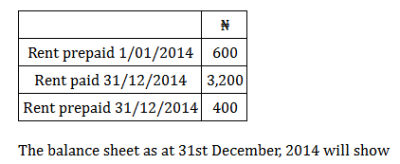 Rent for 2014 chargeable to the profit and loss account is
A shopkeeper purchased 200 bulbs for ₦10 each. However, 5 bulbs were fused and had to be thrown away. The remaining were sold at ₦12 each. What will be the percentage profit?
In which type of enterprise relationship does an increase or decrease in the production of one product affect the production of the other commodity inversely (where one can only increase at the expense of the other)?